Getting Started
Welcome to the Iron Jetpacks mod! This mod adds a variety of jetpacks to help you navigate your world with ease.
Keybindings
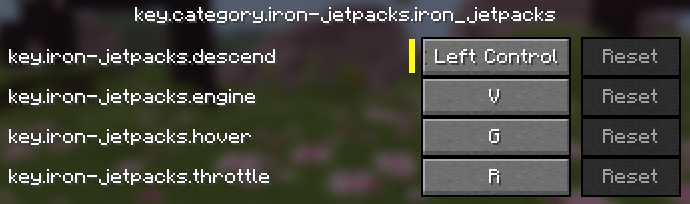
By default, the jetpack is controlled using specific keys. You can change these in the Minecraft settings under Controls Key Binds.
Installation
CurseForge Installation
- Create or use a modpack that's on Minecraft 26.1-26.1.2 and Fabric 19.2 (not strictly 19.2; other versions compatible with Minecraft 26.1-26.1.2 will likely work perfectly fine).
- Press the Gray "+ Add Content" button below the Orange play button and search for "Iron Jetpacks(Port)". The mod should appear. Mod Curseforge
- Press install on the mod and it should install automatically with all required dependencies!
- Launch the game and enjoy!
Manual Installation
- Install Fabric Loader.
- Place the Iron Jetpacks
.jarfile in yourmodsfolder. - Install the required dependency mods:
TechReborn-6.0.4.jarFabric-Api-0.150.0+26.1.2.jarfzzy_config-0.7.6+26.1.jarfabric-language-kotlin-1.13.11+kotlin.2.3.21.jar
- Install recommended mods:
jei-26.1.2-fabric-29.6.2.31.jarModMenu-18.0.0-alpha.8.jar
- Launch the game and enjoy!
[!NOTE] The specific file names and versions listed above are just the developer's chosen tested versions. The most updated versions available for the 26.1-26.1.2 cycle will likely work perfectly fine!